 By Michael Caine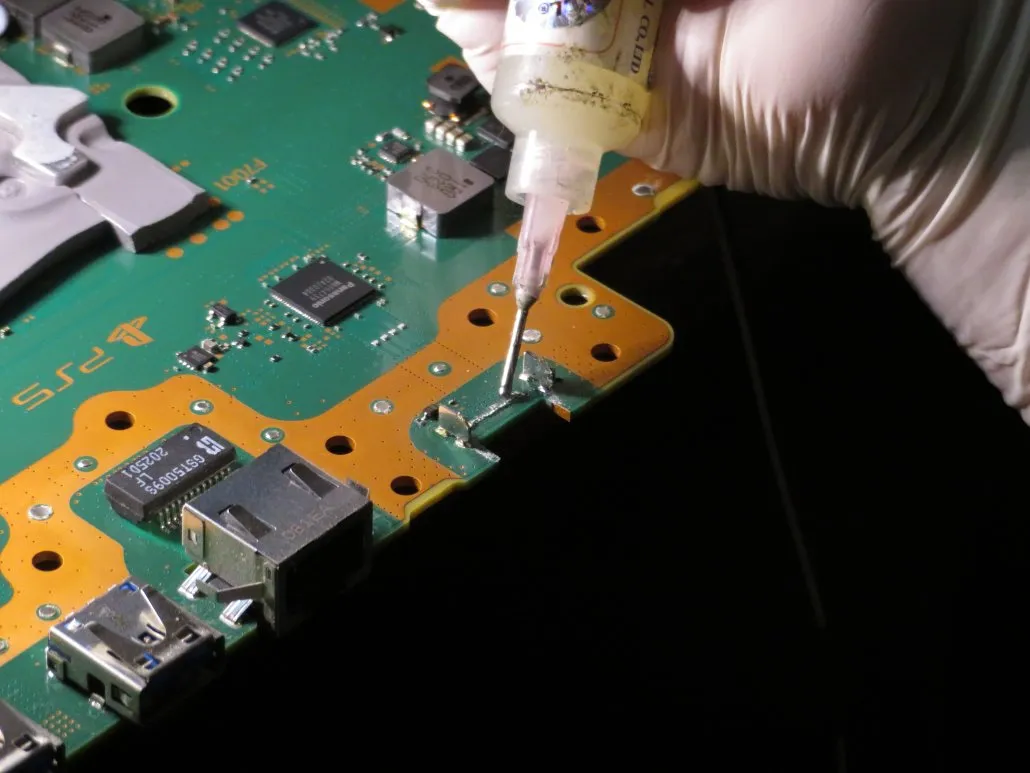
Yes. A damaged HDMI port is one of the biggest reasons a PS5 turns on but leaves you staring at a totally blank TV screen. Inside that HDMI port on the back sit nineteen tiny copper pins. They send video, audio, and resolution settings straight to your television set.
When even one of those little pins gets bent out of place, jammed backward, or broken off, the video feed cuts out instantly. Your console might boot up completely fine in the background. However, without a solid hardware connection, your display stays pitch black or shows a “No Signal” message.
Key Takeaways
- A damaged rear port physically blocks video data from reaching your television screen. This causes a total blackout.
- Your console light bar might turn solid white when you turn it on. That means your system booted up properly, which points straight to a display connection problem.
- Do not try to fix the port on your console with a cheap soldering iron. You can easily tear off the tiny copper pads on the circuit board.
- Booking a professional PS5 repair Calgary technician ensures the broken piece gets desoldered safely and replaced with a fresh factory port.
Is It Possible for a Damaged HDMI Port to Cause No Picture on a PS5?
It happens to gamers every single day. The PlayStation 5 uses an HDMI port for video and audio output. It relies on nineteen small copper pins packed tightly inside a metal casing. Every pin has an exact job to do. Some pins carry picture data. Some process audio. Others tell your television what resolution to use. When any pin gets bent sideways, flattened, or torn off the circuit board inside, the whole picture feed stops dead in its tracks.
You might still hear menu clicks through a headset plugged into your controller. You might also notice the main light bar on the console smoothly change from blue to solid white. That is what it always does when starting up normally. Everything on the inside of the machine is working fine. The video signal simply has no physical way to travel out of the box and onto your TV screen.
What to Do If Your PS5 Has No Picture?
Work through a few quick steps at home before you start looking around for local repair services. Make sure a simple setting glitch or a bad wire is not causing the dark screen.
Perform a Full Power Cycle
Draining out leftover power gives the internal system hardware a fresh restart.
- Press and hold down the power button on the front panel until you hear a second beep to shut the system down completely.
- Unplug both the main power cord and the display cable right from the back of the machine.
- Leave everything sitting unplugged for roughly fifteen minutes. This lets all stored energy drain out of the internal parts.
- Plug both cords back in securely. Turn your console back on to check for a picture.
Test Alternate Display Equipment
Check your TV setup to make sure another piece of gear did not fail instead.
- Try a Different Cable: Swap out your current wire for a known working video cord that works on another device.
- Switch TV Inputs: Plug the cable into another slot on the back or side of your television set, like HDMI 2 or HDMI 3.
- Hook Up to Another Display: Plug your console into a PC monitor or a different TV in your home to see if an image shows up.
Boot Into PS5 Safe Mode
Safe Mode forces the console to use basic video output settings. This bypasses tricky 4K features or HDR bugs.
- Make sure your console is powered completely down. Ensure it is not sitting in rest mode.
- Press and hold the power button for about seven seconds until you hear a second clear beep.
- Plug your controller in with a USB charging cable. Tap the center PS button.
- Pick Change Video Output if a recovery menu pops up on screen. Drop the resolution setting down to 1080p. Physical hardware damage is almost certainly present inside the port if the screen stays dark even in Safe Mode.
Signs of HDMI Port Damage
Checking the HDMI port on your console with your own eyes can reveal a lot about what went wrong.
- Crooked or Missing Pins: Grab a bright flashlight. Look straight into the back port. You might see gold or silver pins bent sideways, squished flat into the plastic, or completely missing.
- Wobbly Cable Connection: It should fit snugly into place when you plug your cord in. The inside housing is likely broken if the cord feels super loose or wiggles easily side to side.
- Flickering Picture Before Blackout: Your screen might flicker wildly, display strange static, show green lines, or drop the image whenever someone bumps the TV stand.
- Picture Only Works at an Angle: The image only shows up if you prop up the cord with a book or hold it at an unnatural upward angle.
- Cracked Plastic Piece: The dark plastic alignment block in the middle of the metal socket is chipped, cracked, or completely broken off.
Causes of PS5 HDMI Port Damage
These back outlets are surprisingly fragile. Simple everyday accidents can break the tiny pins inside without using much force at all.
- Accidental Drops and Knocks: The heavy cord pulls hard on the socket if the console gets knocked over while plugged in. It snaps it right off the circuit board.
- Tripping Over Loose Cords: Catching your foot on a trailing cable yanks the connector out sideways. This crushes the tiny pins inside instantly.
- Moving the Console Often: Unplugging the system regularly to bring it over to a friend’s house or move it between rooms causes steady wear and tear.
- Forcing the Cord in Upside Down: Trying to plug the cord in blindly from behind can jam the plug in backward. That flattens the internal pins right away.
- Dirt and Dust Buildup: Dust bunnies or small bits of dirt trapped deep in the socket block the plug. This makes people force the cord in way too hard.
Why DIY Repairs Are Risky for Amateurs
It is tempting to think you can fix a broken back port on your own using simple household items or a cheap soldering tool you bought online. However, modern game consoles use multi-layer circuit boards. They are packed with microscopic parts placed right next to the display port.
You can easily melt tiny surrounding components, burn the board, or tear away the delicate copper traces that carry video signals if you try to apply heat without the right equipment. Repairing the console becomes far more difficult and expensive once those copper traces get ripped off the motherboard. Leaving port replacements to experienced technicians with specialized tools protects your investment. It ensures your console gets fixed correctly.
What to Expect During a Professional Port Repair
Professional repair technicians follow a very specific process to fix the broken hardware safely when you hand your console over to them.
First, they carefully disassemble the entire PlayStation 5 to remove the main motherboard from the plastic shell. Next, they use a specialized hot air rework station to melt the old solder evenly. They lift the broken port off the board without damaging the surface underneath.
They align a brand-new factory-spec port after cleaning the contact pads and applying fresh solder. They heat it precisely into place. Finally, they inspect every tiny pin under a microscope to make sure the electrical connections are solid before reassembling the unit and running thorough video output tests.
Conclusion
Staring at a black screen when you just want to sit down and game is frustrating. However, a broken video outlet does not mean your PS5 is ruined forever. Testing a few simple fixes at home helps you figure out if physical damage is the real root cause of your issue. Reaching out for trusted PS5 repair Calgary services is the best way to get your machine fixed safely because replacing this back connector requires steady hands and special heat tools. Your console will be back to giving you smooth, colorful gameplay in no time once a new outlet is installed.
Read More: Why Is My PS5 Suddenly Not Responding?