 By Michael Caine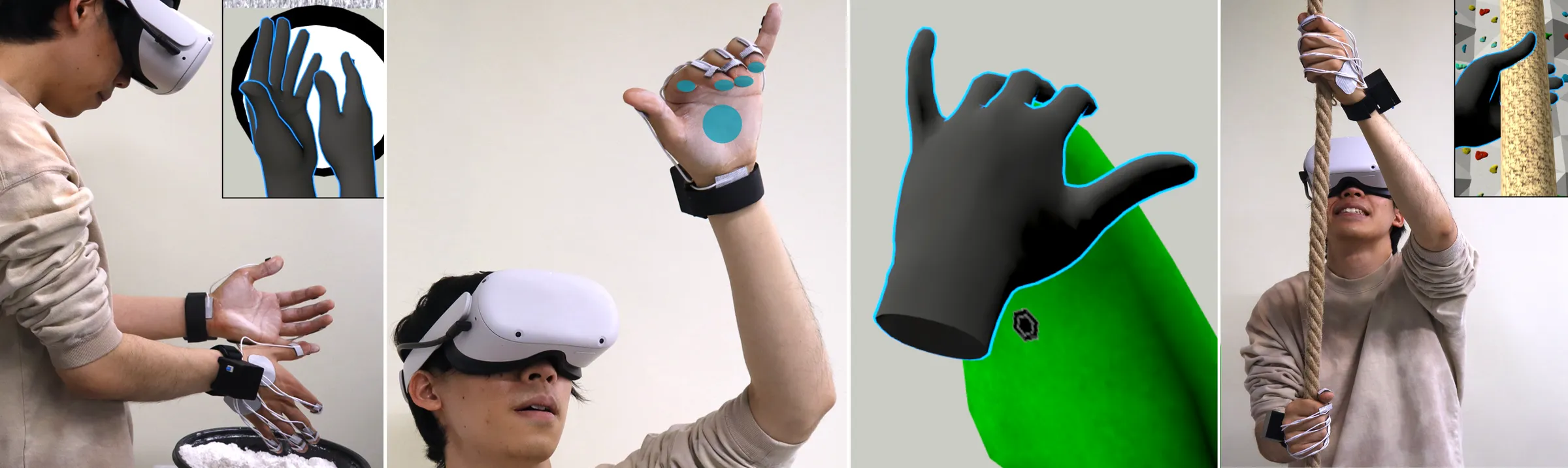
The next big change in screens may not be something you see. It may be something your hand believes. Haptic feedback technology is moving past the flat buzz of a phone alert and toward touch cues that can suggest pressure, texture, direction, resistance, and even warmth. That matters for American gamers, medical trainees, remote workers, product shoppers, and anyone watching VR grow from a headset demo into a tool people may use for serious work. For readers following how consumer tech shifts into daily life through digital innovation coverage, the bigger story is trust. Virtual touch only works when your brain stops treating it like a trick. Recent research points to multisensory systems that combine vibration, skin stretch, pressure, and temperature instead of leaning on one motor doing one job. Rice University researchers described this move from simple cues toward richer wearable touch systems, while Northwestern engineers showed a wireless device that can create pressure, sliding, twisting, stretching, and vibration on skin.
Why Touch Has Been the Missing Sense in Digital Life
Sight and sound have had a long head start. A cheap TV now gives you sharp color, fast motion, and audio good enough for a small living room. Touch has not kept pace. Most people still know digital touch as a phone buzz, a controller rumble, or a smartwatch tap. Useful, yes. Believable? Not yet. The gap matters because the hand is not a side character in how people understand the world.
A buzz can warn you, but it cannot convince you
A vibration alert is a signal. It tells you something happened. It does not tell you what the object feels like, whether it has weight, or how hard you pressed. That is why so many VR demos feel strange after the first minute. Your eyes say, “grab the tool,” while your fingers say, “there is nothing here.”
Researchers at Rice noted that newer wearable haptics now aim beyond single-sense vibration by mixing touch cues such as skin stretch, pressure, temperature, and vibration. That shift is not a small polish pass. It changes what the body can understand. A buzz can mark contact. Skin stretch can hint that an object moved. Warmth can make a surface feel less dead. Pressure can make a button feel chosen instead of tapped in air.
This is why virtual touch has a harder job than VR graphics. Bad graphics still give you a scene. Bad touch breaks the deal between your hand and the digital object. In a U.S. living room, that can mean a game feels cheap. In a training lab, it can mean a learner gets the wrong habit.
The hand notices small lies faster than the eye
The eye forgives more than the hand. A video call with a little blur can still feel normal. A fake handshake that lands late or presses in the wrong direction feels wrong at once. Your skin has many receptors, and each one cares about a different part of contact.
Northwestern’s 2025 device is useful here because it shows where the field is heading. The team described a compact wireless actuator that can push skin in different directions, creating sensations such as pressure, sliding, twisting, stretching, and vibration. The key is not “more buzz.” It is motion with direction.
That detail sounds technical, but the everyday meaning is simple. A flat button on a future tablet could feel like it dips. A map cue on a wearable could tug you left without forcing you to look down. A remote-care tool could help a clinician guide a patient through a movement with touch cues, not only spoken directions. The non-obvious part is that realism may come from restraint. A tiny correct cue often beats a loud fake one.
Where Haptic Feedback Technology Becomes Useful Before It Feels Magical
The public tends to judge touch tech by the most dramatic demo. Can you feel rain in a game? Can you shake hands across a continent? Can a glove make a virtual coffee mug feel solid? Those questions are fun, but they miss the nearer market. The first wins may be quieter. Better training. Safer attention. More useful wearables. Interfaces that let people act without staring at a screen.
Medical training needs friction, not fantasy
American health care has a strong reason to care about touch in VR and AR: practice without putting a patient at risk. A student can watch a procedure video many times and still not know how a tool should feel in the hand. A haptic cue can teach timing, angle, resistance, or the danger of pressing too hard.
The FDA already tracks AR and VR medical devices authorized for marketing in the United States through its official list, and that list is meant to help providers, patients, and developers understand the market and safety review landscape. See the FDA’s AR/VR medical devices list for the agency’s current resource.
The surprise is that medical haptics does not need to copy the whole body to help. A training system may only need to make one moment feel honest: the resistance of tissue, the click of a tool, or the difference between a light touch and a harmful push. That narrow goal is less flashy than a full-body suit, yet it may change skill faster.
Gaming will sell the feeling, but work may prove the value
Gaming will likely keep haptics in public view because players love sensation. A vest pulse, a glove tap, or a controller kick can add drama. Products such as haptic suits and VR accessories already show how consumers respond when action moves from screen to body.
Workplace uses may be where the strongest case forms. Think about an auto technician learning a repair in a headset, a warehouse worker receiving touch cues while keeping eyes on a shelf, or a remote robot operator handling a fragile object. In these settings, tactile feedback is less about wonder and more about fewer mistakes.
A recent N2D glove paper from UC San Diego researchers focused on directional fingertip force for contact-rich robot teleoperation. The project argues that many wearable gloves leave force direction unclear, which can lead users to over-press or rely too much on vision. Directional finger cues improved contact control in the study setting.
That example points to a future buyer question: does this touch cue reduce error, fatigue, or training time? If the answer is yes, companies will not need a sci-fi pitch. They will have a practical reason to pay.
What Makes Realistic Touch So Hard to Build
Touch looks simple from the outside. Press skin, make a sensation, repeat. The body does not make it that easy. Skin changes from person to person. A cue on the fingertip may feel sharp, while the same cue on the forearm feels dull. Sweat, hair, age, strap pressure, and motion can alter what reaches the nerves. That is why the best haptic systems need engineering and patience.
Skin is not a flat screen
A display sends pixels to a mostly predictable surface. Skin is alive. It stretches, folds, dries, sweats, and shifts over bone and muscle. Rice researchers called out skin contact mechanics and tactile masking as two hard problems. Tactile masking happens when one touch cue interferes with another, so a mix of vibration and stretch may feel less clear than expected.
This is where many product dreams slow down. A lab demo can fit one person well for ten minutes. A U.S. consumer product has to fit many bodies, survive daily use, and stay comfortable. A glove that feels amazing for one hand may pinch another. A wrist device that feels clear while sitting may become muddy during a run.
That does not mean the field is stuck. It means the winners will treat comfort as part of the signal. A device that annoys your skin cannot teach your skin. The strap, battery, heat, weight, and cleaning routine all shape the final experience.
Soft objects may solve a problem hard gadgets created
One of the more interesting paths is not a harder glove or stronger motor. It is softer hardware. The University of Bath’s HydroHaptics work uses a liquid-filled soft chamber and compact motor so a flexible surface can respond to taps, pinches, twists, and squeezes while still giving tactile cues. The team tested ideas such as a deformable mouse, joystick, backpack strap, and cushion.
That may sound odd until you think about the objects people already touch. Cushions, straps, sleeves, steering wheels, shoes, and handles all live against the body. They do not need to look like gadgets to become interactive. A backpack strap that taps your shoulder for navigation could be safer than checking your phone at a busy crosswalk.
The counterintuitive lesson is that the future of touch may not always sit on the fingertip. Fingers are sensitive, but they are busy. Shoulders, wrists, forearms, and backs can carry simple cues without taking over the task. That opens a wider design space for wearable tech trends beyond gloves and gaming rigs.
The Consumer Future Depends on Trust, Not Hype
For most Americans, the question will not be, “How clever is the actuator?” It will be, “Does this help me enough to wear it, charge it, clean it, and pay for it?” That is the wall every haptic product has to climb. Touch is intimate. A bad notification on a screen is annoying. A bad touch cue on your body feels personal.
Good haptics should disappear into the task
The best touch cue is often the one you stop noticing as a gadget. A smartwatch tap that tells you to turn right works because you do not study it. You act. A good VR training cue should work the same way. You should focus on the procedure, repair, workout, or game, not the motor on your wrist.
This matters for online shopping too. Researchers and product teams often imagine flat screens that can suggest texture, pressure, or material feel. That could help someone compare a couch fabric, a jacket lining, or a phone case surface from home. Yet the cue must be honest enough to guide a purchase. If it feels like a gimmick, returns will teach retailers a hard lesson.
The American market is full of people who buy comfort when it saves time. A haptic navigation strap for runners, a training glove for trade schools, or a tactile screen aid for people with visual impairments could all make sense. The value has to be plain. For a deeper buying angle, a future VR headset buying guide should judge touch support beside display specs, comfort, and app libraries.
Social touch needs consent built into the design
Social touch in VR may be the most sensitive branch. A 2025 paper on multi-user VR social touch described a system with wearable gloves and forearm sleeves that allowed gestures such as pats, pokes, strokes, and squeezes between distant users in a shared virtual space. The work points to a real desire: people want remote presence to feel less empty.
Yet social touch cannot be treated like another emoji. A poke, squeeze, or simulated hug needs clear consent, easy blocking, and context. A family member in another state sending a gentle hand squeeze is one thing. A stranger doing the same in a public VR lobby is another.
This is where design ethics becomes product quality. Controls must be visible. Intensity should have limits. Users should know who can touch them, where, and when. If companies get that wrong, virtual touch will feel unsafe before it feels meaningful. If they get it right, remote meetings, therapy, education, and long-distance family calls could gain a layer that video has never carried.
Conclusion
Touch is becoming the next test of whether digital life can feel useful instead of thin. The strongest progress is not about making every virtual object feel perfectly real. That goal may stay out of reach for years. The better goal is to make the right cue arrive at the right moment, with enough clarity that your body trusts it. Haptic feedback technology will matter most when it helps people act with less doubt: a trainee pressing with safer force, a gamer reading direction by feel, a shopper sensing material differences, or a remote worker guiding a machine without staring at a screen. The market will punish bulky gear and cheap buzzes, but it will reward touch that earns its place. For U.S. buyers, the smart move is to watch for comfort, software support, safety controls, and proof that the device improves a task. Do not chase the loudest demo. Chase the touch you can forget is artificial.
Frequently Asked Questions
How does virtual touch work in VR devices?
Virtual touch works by sending controlled physical cues to the skin through motors, force systems, air, heat, or soft actuators. The brain combines those cues with what the eyes see, so a digital object can feel closer to something your hand understands.
Is tactile feedback only useful for gaming?
No. Gaming is the easiest place to notice it, but training, medical simulation, accessibility, robotics, fitness, navigation, and online shopping may benefit too. The best use cases are tasks where a touch cue helps people move, decide, or learn with less hesitation.
Are haptic gloves worth buying for home VR?
They can be worth it for serious VR fans, sim users, and developers, but casual users should be careful. Fit, app support, battery life, and comfort matter more than the demo video. A glove with poor software support can become an expensive drawer item.
What is the difference between vibration and force feedback?
Vibration shakes the skin to signal contact, impact, rhythm, or direction. Force feedback pushes back against your movement, so you feel resistance or pressure. Force systems can feel more convincing, but they often cost more and need bulkier hardware.
Can haptics help medical students learn faster?
It can help when the lesson depends on pressure, resistance, tool angle, or hand timing. It does not replace supervised practice, but it can make simulation less visual-only. That matters for skills where feeling the difference between safe and unsafe force matters.
Will phones get more realistic touch features?
Yes, but likely in small steps. Phones may add better texture cues, sharper button feelings, or richer screen responses before they can copy true material feel. Thin devices have space and power limits, so progress has to fit inside tight hardware.
Is social touch in VR safe?
It can be safe only when consent controls are clear. Users need simple ways to block, limit, mute, or approve touch cues from others. Social touch should never be treated like a default chat feature because the body reacts to it differently than text.
What should buyers check before choosing haptic accessories?
Check comfort first, then supported apps, battery life, setup steps, return policy, and whether the device solves a problem you already have. Stronger feedback is not always better. Clear, well-timed touch cues usually matter more than raw intensity.